

How it works
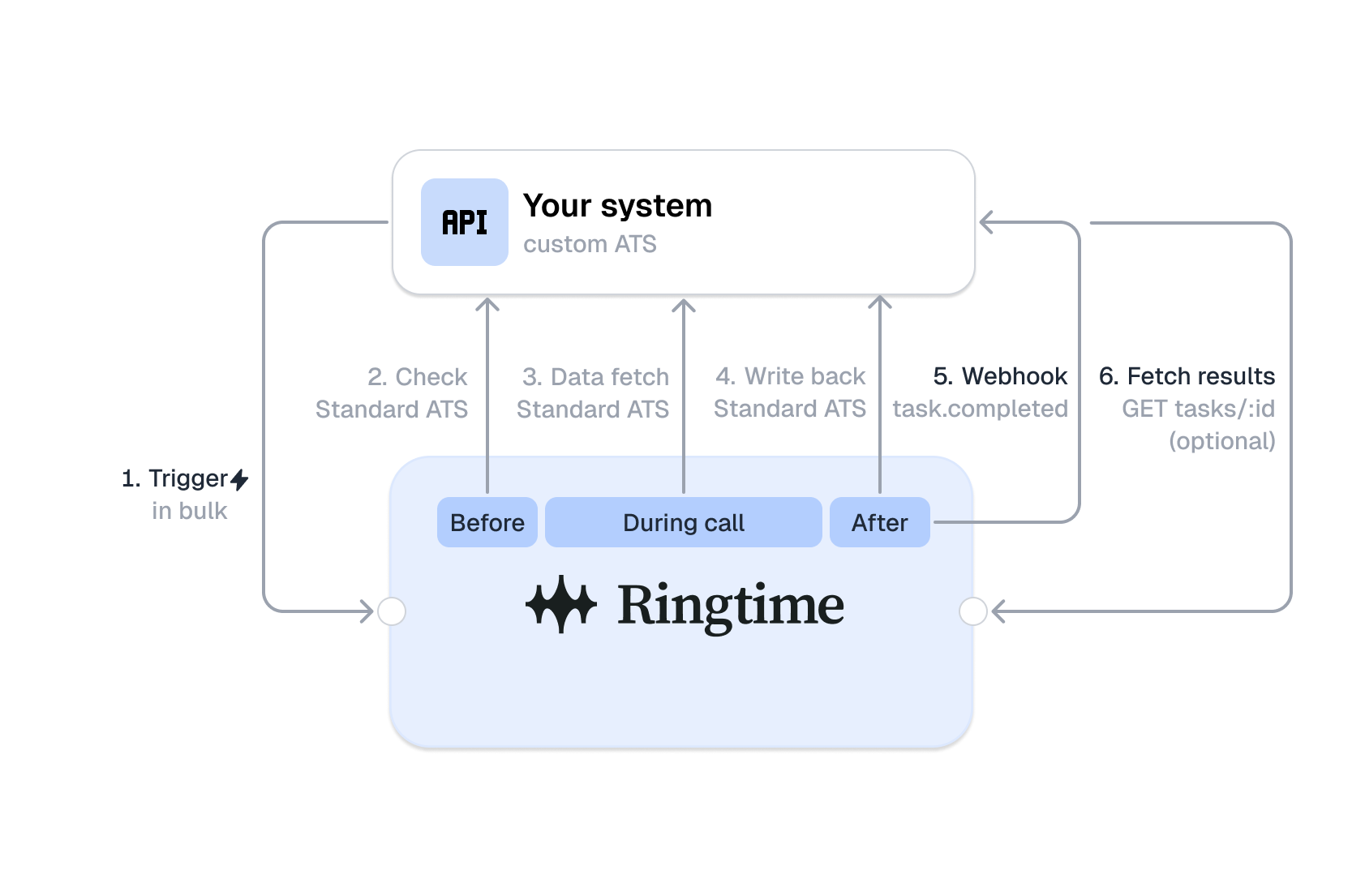
Ringtime runs voice calls and WhatsApp chats for you. You send a trigger to start a screening. Ringtime sends a webhook to tell you the result.
Between those two points Ringtime also reads from and writes to your ATS, so your recruiters see the outcome where they already work. The diagram shows the whole path.
Key terms
- Task: One screening job for one person. A trigger opens a task.
- Interaction: One contact attempt, for example one call. A task can have more than one interaction.
- Campaign: The screening flow. You do not create a campaign. You address a campaign with a routing key.
Triggers
A trigger tells Ringtime to start a screening.
- Your system sends
POST /api/v2/triggersto Ringtime. - The request includes the routing key, the contact data, and your external ids.
- Ringtime opens a task and sends back a
task_id. - Store the
task_id. Use it to cancel the task or to match a later webhook.
If you send a trigger for a person who is already enrolled in that campaign, Ringtime does
not open a second task. It answers HTTP 409 with error code DUPLICATE_TASK. The response
details carry existing_task_id, the task from the first trigger.
Outbound webhooks
A webhook tells you the result of a task. Ringtime sends it to the endpoint your organization registered.
Ringtime sends two types of webhooks:
task.completed: The final result of the task. Ringtime records it one time only. Your endpoint receives this one by default.interaction.finalized: The result of one contact attempt. One for each attempt. Ask Ringtime to add it to your subscription if you want per-attempt detail.
Ringtime retries a webhook when your endpoint does not answer with a 2xx status. Treat a
repeated webhook-id as the same event.
Each webhook carries three headers: webhook-id, webhook-timestamp and
webhook-signature. The signature follows the
Standard Webhooks specification (HMAC-SHA256).
Check the signature before you trust the data. Use a Standard Webhooks library for your
language. Your webhook secret comes from Ringtime with your endpoint registration.
Summary
- You send a trigger to start a screening.
- Ringtime opens a task and runs the screening.
- Ringtime sends a webhook with the result.
- You read the webhook and update your own system.